
Payment Methods
Fast deposits, quick withdrawals, and secure checkout options.











BPExch Wallet App Download & Installation
Getting started with our BPExch wallet is straightforward. Download the app directly from our official website and install it on your Android device in minutes. Here’s everything you need to begin managing your funds.
Android APK Download Steps
- Visit the official BPExch website and navigate to the mobile section
- Tap the BPExch wallet app download button to save the APK file
- Enable ‘Install from unknown sources’ in your device settings, then open and install the downloaded file
Minimum Device Requirements
Our BPExch wallet app requires Android 5.0 or higher and typically needs 50–80 MB of storage space. Visit our official site to download the latest version compatible with your device.
How to Login to Your BPExch Wallet
Access your BPExch wallet securely using your registered mobile number and OTP verification. We’ve streamlined the login process to get you started in seconds, with instant authentication and direct access to your funds.
Login Steps
- Enter your registered mobile number on the bpexch wallet login screen
- Receive and enter the OTP sent to your phone
- Access your wallet dashboard immediately after verification
OTP Not Arriving?
Wait 60 seconds and request a new code, or contact our WhatsApp support team for instant assistance with login issues.
Deposit Methods – JazzCash, Easypaisa & Crypto
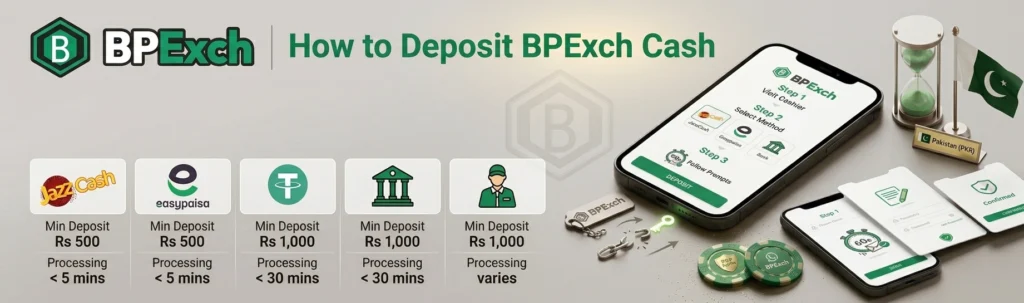
We support three convenient channels to fund your bpexch wallet: JazzCash, Easypaisa, and USDT cryptocurrency. All methods carry zero platform fees, though payment providers may apply their own charges. Processing times and limits vary by channel, so always check the Cashier page for current figures before you deposit.
Supported Deposit Channels
Choose the method that suits you best. Limits may vary based on account status and provider availability.
Method | Min Deposit (PKR) | Processing Time |
|---|---|---|
JazzCash | Rs 500 | Instant |
Easypaisa | Rs 500 | Instant |
USDT Crypto | Rs 1,000 equiv. | 5–15 min |
How to Add Funds
- Open your wallet and tap Deposit.
- Select your preferred method and enter the amount.
- Confirm the transaction.
For current limits and bpexch wallet download instructions, visit the Cashier page.
BPExch Wallet Withdrawal – Steps & Timelines
Cashing out your winnings from your bpexch wallet is straightforward. We process all bpexch wallet withdrawal requests securely, with CNIC verification ensuring AML compliance and protecting your funds throughout the transaction.
How to Request a Withdrawal
- Navigate to Cashier: Log in and select ‘Withdraw’ from your wallet dashboard.
- Enter Amount: Input your desired withdrawal (minimum Rs 500). CNIC verification is required for your first bpexch wallet withdrawal.
- Confirm Method: Choose JazzCash, Easypaisa, or crypto, then confirm your request.
Processing Time
We typically process bpexch live withdrawal requests within 6 hours (subject to verification). Most payouts complete faster during business hours, ensuring you receive your funds promptly.
BPExch Cash Balance & Wagering Conditions
Your bpexch wallet displays bonus and real-money balances separately, ensuring full transparency. We apply wagering conditions to promotional funds before withdrawal eligibility is granted.
Bonus vs Real-Money Balance
Bonus cash and real funds appear as distinct entries in your bpexch wallet for clear tracking.
Rollover Before Withdrawal
We require bonus amounts to meet a rollover multiplier before bpexch withdrawal becomes available. Check our Promotions page for current wagering requirements (T&Cs apply).
- Rollover condition: Bonus funds must be wagered before conversion to withdrawable cash
- Real money: Withdrawable immediately with no restrictions
Security & Responsible Gaming Tools
Your bpexch wallet is protected by industry-standard security protocols and includes built-in tools to help you stay in control of your gaming activity.
Account Protection
- 256-bit SSL Encryption: All transactions and data secured
- Session Timeout: Automatic logout after inactivity
- Two-Factor Authentication: Optional extra login security layer
Responsible Gaming Options
- Deposit Limits: Set daily or weekly caps in account settings
- Self-Exclusion: Temporarily or permanently restrict wallet access
- Reality Checks: Receive session time reminders
Access all controls through your account dashboard to customize your gaming experience.